GitHub Actions Workflow Triggers
GitHub Action triggers
Overview
Workflows in GitHub Actions are triggered by events, and each workflow consists of one or more jobs that run in parallel or sequentially on different runners. Triggers are events that initiate the execution of a workflow.
List Of Triggers:
Push trigger: When you push a commit or tag to the repository, the push trigger is activated. The push trigger is triggered by any changes made to the source code in a Git repository. Examples of such activities include pushing a new branch from your local repository to GitHub.Every time there is a change to the code in the repository, you can also utilize the push trigger to automatically test it.

Running your workflow only when a push to specific branches occurs:
You can use the branches filter to configure your workflow to only run when specific branches are pushed.
workflow will run when someone pushes to 'main' or to a branch that starts with feature/.

Running your workflow only when a push of specific tags occurs:
You can use the tags filter to configure your workflow to only run when specific tags are pushed.
workflow will run when someone pushes a tag that starts with v1.

Pull_request trigger: It is simple for several people to work together on source code in a repository by using pull requests. They let each user work on their own branch of the repository, pulling modifications into one of the main branches afterward. A pull request is made when changes are pulled into the repository's main branches, and it frequently has to be authorized by other repository contributors.
You may want to set up automation on a pull request for a number of reasons. When a pull request is made for a particular ticket, you might want to notify other contributors of the new pull request, remove a branch, or update the status of the job in your project management system.

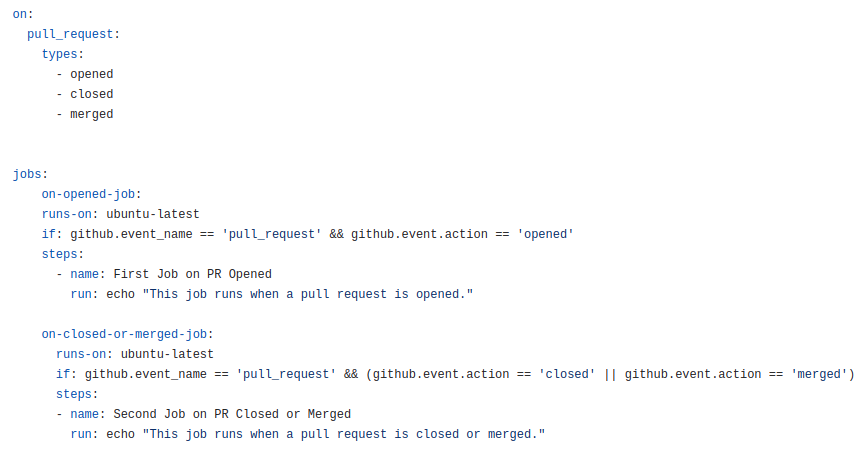
You can also use the pull_request trigger with the condition
when the pull_request will opened then the opened job will trigger and when the pull_request will closed or merged then the closed job will trigger.
Pull_request_review trigger: A pull request review trigger is triggered when a user creates a pull request and submits their review, and it is initiated by that user. A pull request may be accepted, modified, or rejected by a review.

Issue trigger: users create issues in repositories to report bugs and suggest features. These issues can then be discussed by maintainers and users until a solution is found.
Note: This event will only trigger a workflow run if the workflow file is on the default branch.
Workflow can be run when an issue has been opened, edited, or milestoned.

Workflow_dispatch trigger: To enable a workflow to be triggered manually, you need to configure the workflow_dispatch event.
Steps to trigger the event with workflow_dispatch manually
- Go to the project repo and click on actions.
- From the actions page select the workflow file which you want to run.
- On the right side of the action page click on "Run workflow".
- Now from the dropdown click on "Run workflow" and you will see your workflow file will start to trigger.