Creating an IAM User in AWS
Overview
IAM (Identity and Access Management) in AWS allows you to manage users and their access to AWS services securely. Creating an IAM user involves a few straightforward steps outlined below.
Steps to Create an IAM User:
-
Sign in to the AWS Management Console:
- Open your web browser and navigate to the AWS Management Console.
-
Access the IAM Dashboard:
- Once logged in, locate the "Services" dropdown menu at the top left corner.
- Scroll down or search for "IAM" and click on it to access the IAM dashboard.
-
Navigate to Users Section:
- In the left-hand navigation pane, click on "Users" under the "Access management" section.
-
Click on "Create user":
- On the Users page, click on the "Create user" button to start creating a new IAM user.
-
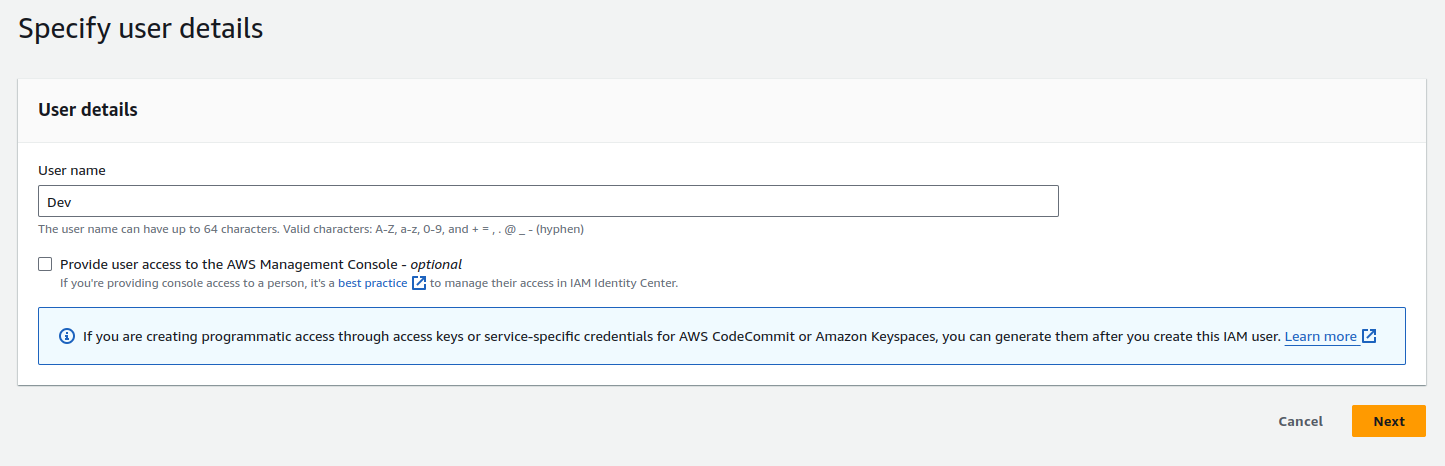
Enter User Details:
- Enter a username for the new IAM user.
- You can also choose to give the user programmatic access (for API and CLI access) and/or AWS Management Console access (for web-based access).
- Click "Next: Permissions" when you're done.
-
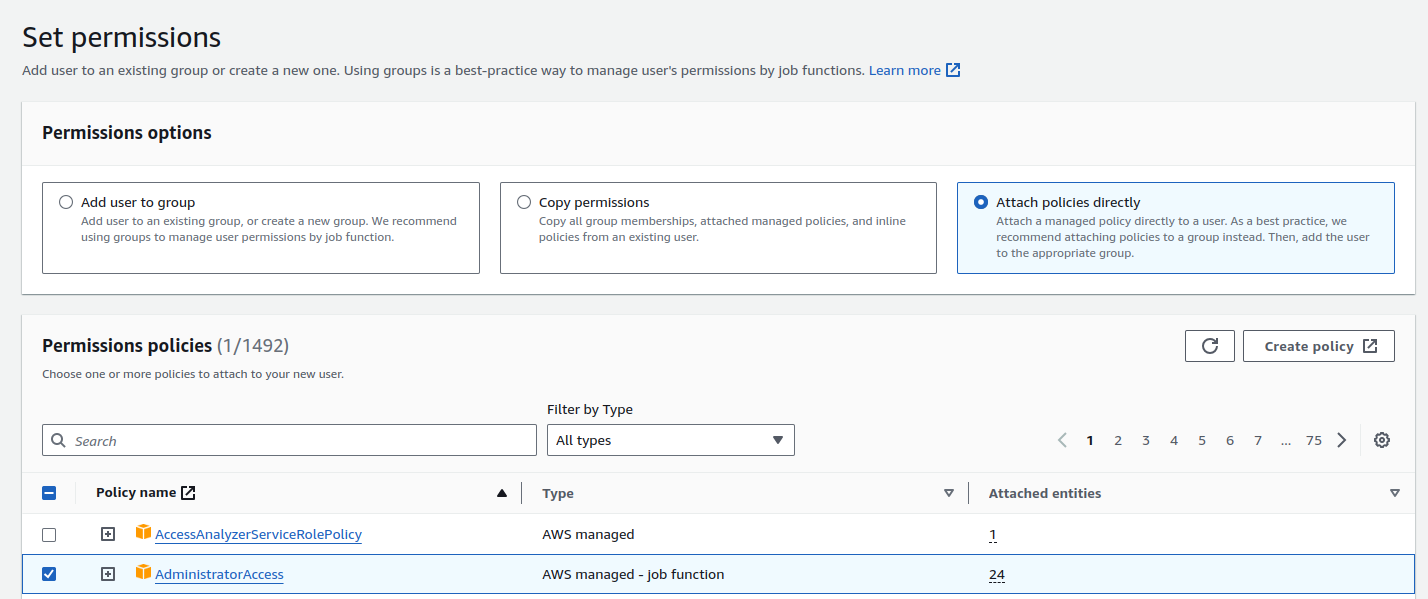
Set Permissions:
- Choose the appropriate permissions for the user. You can either attach existing policies to grant permissions, create custom policies, or add users to groups. Let's give AdministratorAccess for the Dev user.
- Click "Next: Tags" when you're done (optional).
-
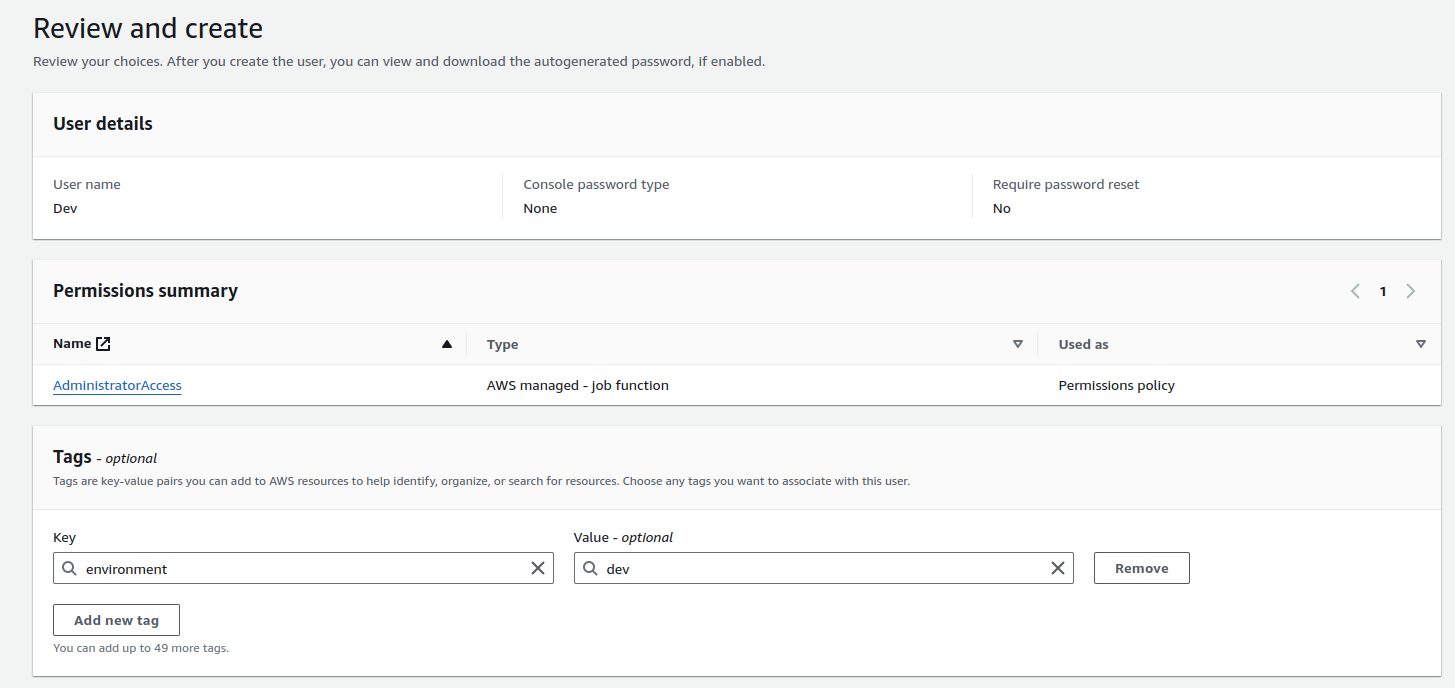
Add Tags (Optional):
- You can add tags to the IAM user for easier identification and management.
-
Review User Details:
- Review all the details you entered for the IAM user.
- If everything looks correct, click "Create user" to finish the process.
-
Generate Security Credentials for the User:
- Navigate back to the IAM dashboard and click on the user you just created (e.g., "Dev user").
- In the "Security credentials" tab, locate the "Access keys" section and click on "Create access key".
- Follow the prompts to generate an access key and secret access key for the user.
- Optionally, you can provide a description and tags for the access key.
- Click on "Create access key".
- You will now receive credentials for the Dev user — an Access Key and Secret Access Key. Save them securely on your device.
- Click "Done". Your credentials for the Dev user are now created.
Additional Notes:
- Security Best Practices:
- Follow security best practices such as enabling multi-factor authentication (MFA) for IAM users, regularly reviewing and rotating access keys, and following least privilege principles.
- Access Key Management:
- Keep access keys secure and avoid sharing them unnecessarily. Rotate access keys regularly for added security.
- IAM Policies:
- Regularly review and update IAM policies to ensure that users have the appropriate level of access based on their roles and responsibilities.
For more detailed information and advanced IAM configurations, refer to the AWS IAM documentation.