Overview
- What is OIDC (OpenID Connect)? On top of the OAuth 2.0 framework, OpenID Connect (OIDC) is an open authentication protocol. OIDC, which is geared towards consumers, enables users to access third-party websites using single sign-on (SSO) by using OpenID providers (ops), like an email service or social network, to validate their identities.
- OpenID Connect (OIDC) allows your GitHub Actions workflows to access resources in your cloud provider without having to store any credentials as long-lived GitHub-Action secrets.
Uses of OIDC
Deployment becomes extremely easy with all popular clouds (like AWS, Azure, GCP, and HashiCorp) by adding OIDC support to their official login action.
Benefits of Using OpenID Connect
- Minimizes the password security risks
- Speeds up the sign-up process
- Seamless transition
- Providing access across different technologies
- Gives better control over your online identity
- Allows smooth integration with other apps
Steps to Create an AWS OIDC Role:
-
Sign in to the AWS Management Console:
- Open your web browser and navigate to the AWS Management Console.
-
Access the IAM Dashboard:
- Once logged in, locate the "Services" dropdown menu at the top left corner.
- Scroll down or search for "IAM" and click on it to access the IAM dashboard.
-
Create Identity Provider → Create identity → Add provider
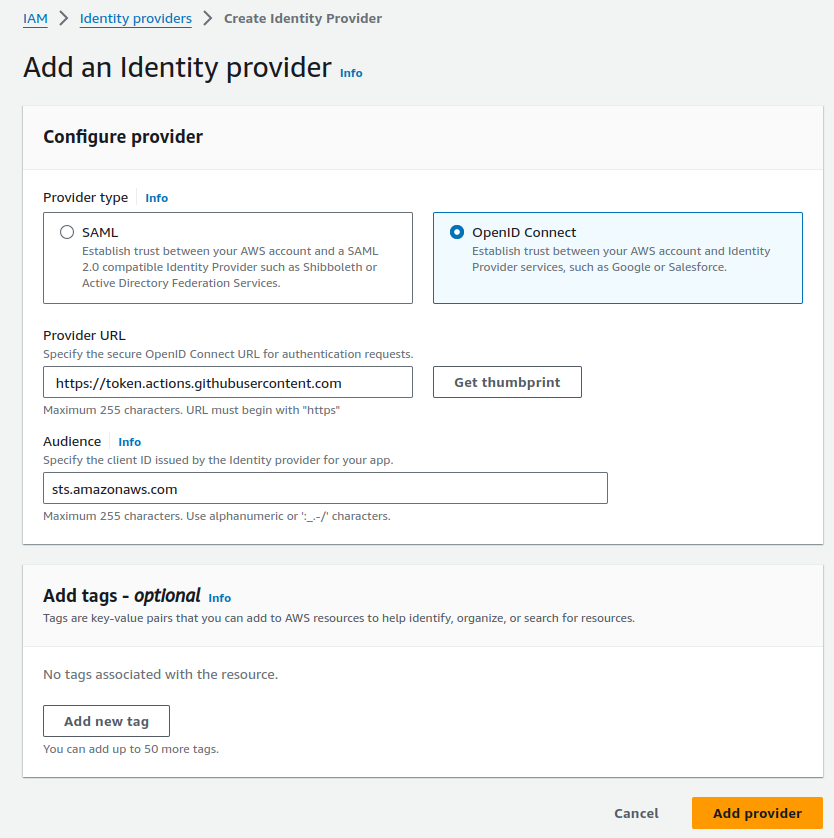
- add provider URL: Use https://token.actions.githubusercontent.com
- Click on Get thumbprint
- For the “Audience”: Use sts.amazonaws.com
- Click on Add provider (Identity provider Created!!!)
-
Add IAM role with Policy for Identity Provider
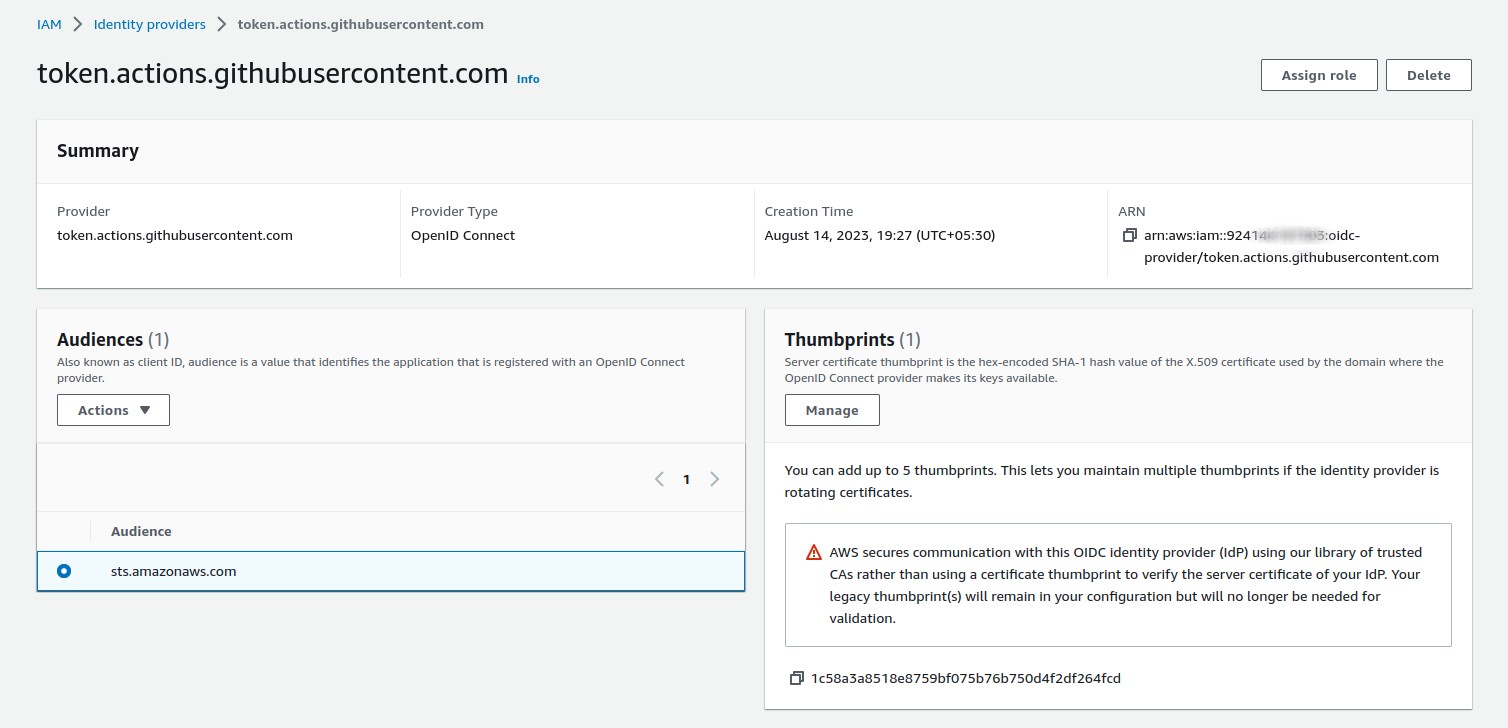
Click on Assign role → go to IAM → Roles → Create a new role → Web Identity
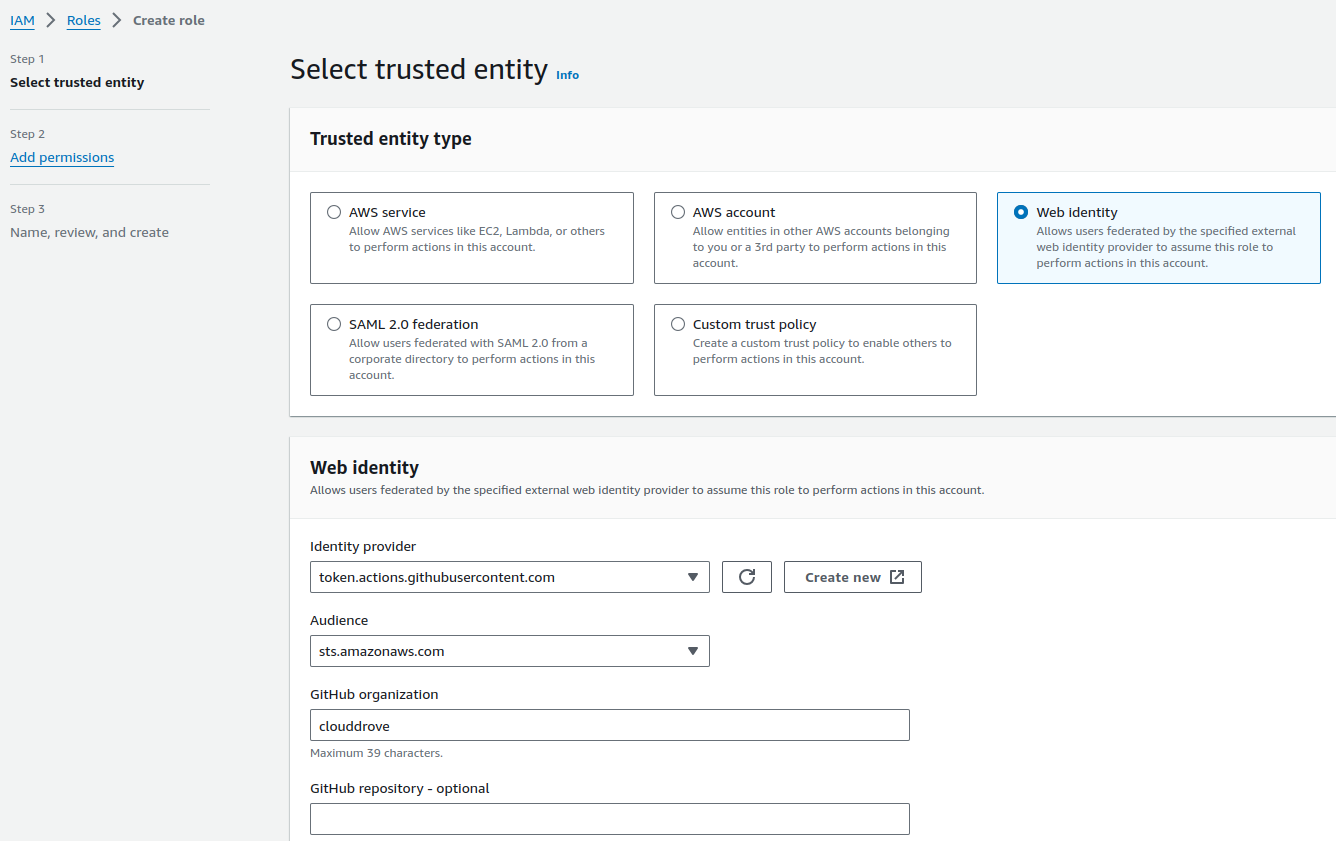
- Add the GitHub organization name where you are configuring this role.
Click on Next → Add Administrator access → Add role name → Click Create role (Instead of Administrator access, you may assign specific resource permissions for the OIDC user, as per requirement.)
-
Update Trust relationship policy
Replace Trust Relationship policy conditions for GithubAccount & GithubRepo and save it. This will build a connection between the OIDC user role and the GitHub account. Refer below
{
	"Version": "2012-10-17",
	"Statement": [
		{
			"Effect": "Allow",
			"Principal": {
				"Federated": "arn:aws:iam::92xxxxxxxx:oidc-provider/token.actions.githubusercontent.com"
			},
			"Action": "sts:AssumeRoleWithWebIdentity",
			"Condition": {
				"StringEquals": {
					"token.actions.githubusercontent.com:aud": "sts.amazonaws.com"
				},
				"ForAnyValue:StringLike": {
					"token.actions.githubusercontent.com:sub": "repo:GithubUserName/repoName:*"
				}
			}
		}
	]
}
- Scenario: when GitHub repo has a branch, following condition needs to be added as well Condition for adding GitHub repo with branch:
"Condition": {
    "StringEquals": {
        "token.actions.githubusercontent.com:aud": "sts.amazonaws.com",
        "token.actions.githubusercontent.com:sub": "repo:GithubUserName/repoName:ref:refs/heads/branchName"
    }
}
Finally, we can use the role ARN for GitHub authentication with AWS.
Simplifying GitHub OIDC Role Creation with CloudDrove's Terraform Module
Meet the aws_oidc_role Module.
The aws_oidc_role module is designed to facilitate the creation of OIDC roles tailored specifically for GitHub repositories. Whether you're deploying applications or managing CI/CD pipelines, this Terraform module provides a clean and modularized configuration for a hassle-free experience.
Module Configuration Made Simple
To integrate the aws_oidc_role module into your Terraform configuration, incorporate the following block:
module "aws_oidc_role" {
  source = "clouddrove/iam-role/aws//modules/aws_github_oidc_role"

  # Module input variables
  provider_url                   = "https://token.actions.githubusercontent.com"
  oidc_github_repos              = ["username/reponame"]
  role_name                      = "GitHub-Deploy-Role"
  oidc_provider_exists           = false
  name                           = "app"                  # For tags
  repository                     = "repository-name"      # For tags
  environment                    = "control-tower"        # Environment for tags
  managedby                      = "[email protected]"
  custom_assume_role_policy      = ""                     # If you have your own policy, add this variable
}
Key Input Variables
provider_url: The URL for the GitHub token provider.oidc_github_repos: A list of GitHub repositories in the format["username/reponame"].role_name: The name of the IAM role to be created.oidc_provider_exists: Set to false if the OIDC provider doesn't exist.Tagging Variables:name,repository,environment- Tagging variables for improved resource management.managedby: Email address for identifying the entity responsible for managing the resources.custom_assume_role_policy: Add your custom assume role policy if needed.
Explore the Source Code
The heart of this solution lies in its meticulously crafted source code, available on Terraform Registry at clouddrove/terraform-aws-iam-role//submodules/aws_github_oidc_role.
Dive into the codebase to gain a deeper understanding, contribute to its development, or report any issues you may encounter at [email protected].